
Open Door provides the gateway for communication between two Logpoints. You must enable Open Door before a remote Logpoint can add yours as its Distributed Logpoint. You can then centrally manage the logs of multiple Logpoint machines. In a distributed setup, the main Logpoint (Search Head) controls and manages all the other Distributed Logpoints.
If the machines in a distributed setup are on a different network and there is a firewall in between, you need to open 1194/UDP and 443/TCP (HTTPS) ports in the router.
You need to enable Open Door in the following two cases:
Connection between Distributed Logpoint (DLP) and Search Head: Enable Open Door on the DLPs.
Connection between Logpoint Collector (LPC) and Search Head: Enable Open Door on the main Logpoint (Search Head).
You need to open the following port in the router before enabling open door:
Port/Protocol |
Reason |
Direction |
|---|---|---|
1194/UDP |
Allow Open VPN to access the distributed Logpoint. |
Inbound direction for DLP-Search Head connection. Outbound direction for LPC-Search Head connection. |
443/TCP (HTTPS) |
Secure communication for Logpoint. |
Allow request and response communication to the Search Head from the Distributed Logpoint. |
The private network address needs to be unique for each Logpoint.
To enable Open Door:
Go to Settings >> System Settings from the navigation bar and click Open Door.
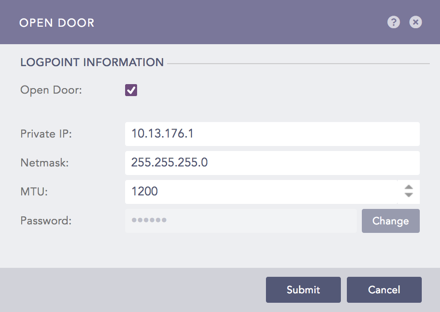
Open Door
Enable Open Door.
Copy the Private IP address and Netmask. Remember the Private IP and Password. You need them to configure the DLP server.
Enter the Maximum Transmissions Unit (MTU) in bytes. This is the maximum packet size that can be transferred between the Logpoint machines.
4.1. In Logpoint Collector, you must re-enter the password under Settings >> Configuration >> Distributed Logpoint in the connected Logpoint Collectors.
4.2. In Distributed Logpoint, you must re-enter the password under Settings >> Configuration >> Distributed Logpoint in the main Logpoint.
The default value is 1500. You can enter any value between 46 and 1500. We recommend you enter a value higher than 1000 to maintain a stable connection. Small values lead to high network overhead, and may cause network failure or instability.
Enter a Password.
Click Submit.